Store Suite
Building a Shopify App.
From a conversation with a friend to a Shopify approved app.
“I'd never built a Shopify app, but I was up for the challenge. I had an idea and I worked out how to make it happen.”
Capabilities
- Product decisions
- Used conversations with Jade and my own store experience to decide what the app needed to solve.
- Stock and pricing rules
- Worked through shared inventory, trade prices, retail sales and made-to-order products.
- Promotion systems
- Planned campaigns, standing rewards, pack pricing and special-date offers as connected parts.
- Merchant experience
- Designed guided setup and previews so complex choices are easier to check.
- Platform research
- Found a Shopify distribution limit and chose a route that kept the working checkout logic.
- Testing and review
- Tested against real themes and prepared the app for Shopify's first-round review.
- Directing AI tools
- Used AI for research and development, then checked the results against store behaviour.
Software
- Shopify
- App admin, checkout functions and theme app blocks.
- Claude and ChatGPT
- Research, development and review support.
- cPanel
- Hosting and deployment for the app.
The idea
A problem I recognised from both sides
My friend Jade had moved the retail side of Biggies Raw Pantry to Shopify, while wholesale was still running on WooCommerce. The trade side was cumbersome to manage, and retail promotions could affect wholesale prices. Keeping the two sides on separate platforms also made stock harder to keep track of.
I'd run my own ecommerce store for years and knew how much work sits behind a sale: changing prices, checking what applies, then putting everything back. Talking with Jade made me wonder if I could build a Shopify app that dealt with these problems together. It was also a chance to learn how to build an app.
The plan
Planning & Foundations
I wanted retail and wholesale customers buying from one catalogue and one pool of stock. Wholesale needed its own prices and order minimums, while retail sales and rewards needed to run without changing those trade prices.
I worked with AI to research what was possible in Shopify, plan the features and build them. I kept coming back to what would happen when wholesale and promotions met in the same cart, and what a store owner would need to understand while setting them up. I tested the pieces as they came together on a development store and then my own store.
Wholesale
Two ways to place a wholesale order
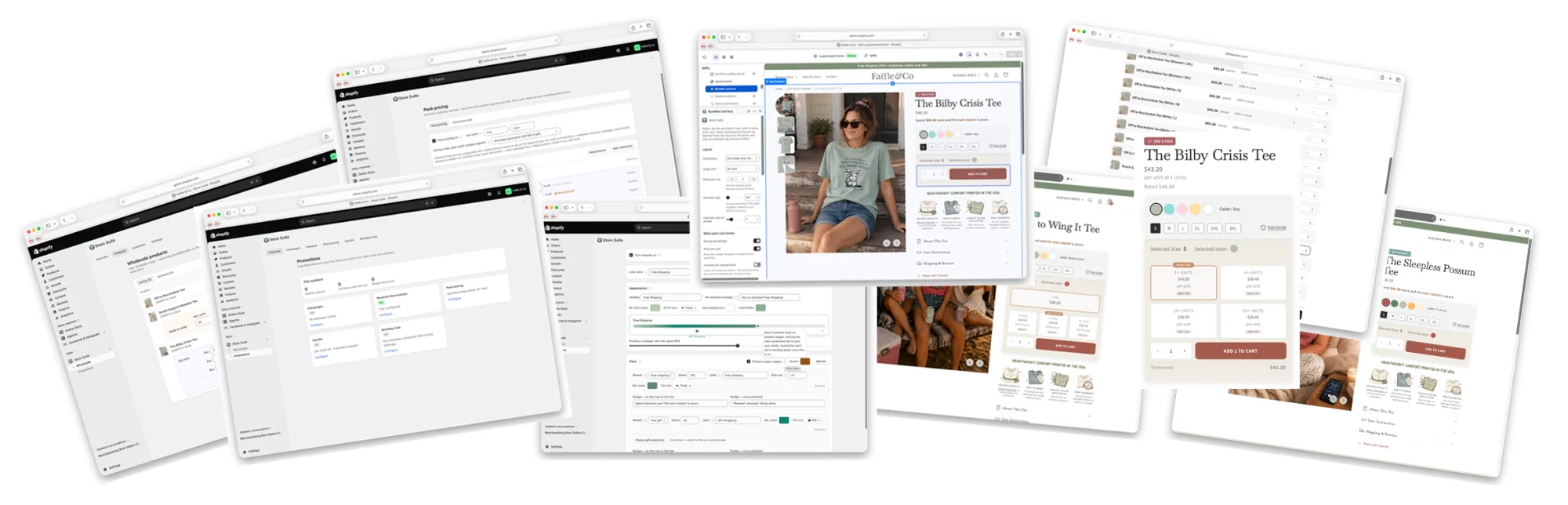
A buyer can browse the store, discover a new product and add it to the cart as they go. When they know what they need next time, they can use the quick-order page instead. It lists the wholesale products together, with their price, available stock, minimum quantity and any price breaks, so they can enter quantities down the page.
Retail and wholesale orders draw from the same products and stock, but trade buyers have their own prices and order rules. For selected products, they can order more than is on hand. Buyers can see what is available now, what needs to be made and the approximate wait.
Getting quick order and the cart to agree
Building the list was only part of it. In testing, items could be added while the cart drawer still appeared empty. Removing an item could show an error even though it had been removed, or leave its old quantity in the form. I traced the problems through the way Shopify updated the cart from that page and kept testing until the form and cart agreed.
A closer look
Wholesale screens
Quick order and cart
Browsing as a wholesale buyer
Merchant controls
Promotions
More than a sale campaign
From running my own store, I knew how easy it was to miss a price when setting up a sale, or forget to put it back afterwards. I wanted merchants to be able to plan a promotion and see how it would behave before customers did.
Campaigns
A campaign can cover the store or selected products and collections, with different discount rates where needed. The merchant sets the timing and can add VIP access, a waitlist and store messages. A guided setup shows the choices together before the campaign is armed.
Rewards and pack pricing
Offers can also run between campaigns. A cart progress bar shows the next spend threshold for a gift, a saving or free shipping. Gifts are added when earned and removed if the cart drops below the threshold. Separate pack-pricing rules give retail customers a better price for buying more of a product.
Cart suggestions and bundles
The cart can suggest products based on what's already there, including a bundle containing an item the customer has picked. Store Suite recognises the products inside existing Shopify bundles, so the suggestion is relevant while Shopify continues to track stock for the individual items.
Special dates
One customer can register dates for several people or pets. The app creates a single-use code for each date and passes it to the connected email platform for the reminder. It could be a treat for two dogs in one household, or birthdays in a children's clothing store.
A closer look
Promotions screens
Campaign setup
Rewards and pack pricing
Cart suggestions and bundles
Special dates
A roadblock
The checkout rules worked in testing, but there was a catch
The app used Shopify checkout functions to keep wholesale prices and retail promotions separate. I had planned to install it privately on one store. Then research showed those functions would only run through a private app on a Shopify Plus store. My development store had Plus features included, so the problem hadn't appeared in the early tests.
I had two choices: rewrite the app and give up some features so I could install it privately on a Basic store, or prepare it for Shopify review as an unlisted public app. I checked the code with AI and confirmed the features themselves didn't need Plus. The private installation route was the problem, so I chose the review process and kept the app I'd built.
Preparing for review
Approved on the first submission
Getting Store Suite ready for Shopify review took its own round of problem solving. After I moved it into my own Partner account, it stopped installing. A day and a half of checks and a support ticket traced it to a setting that had worked for older apps. I also added encryption before completing the data protection form and fixed cart problems that only showed up when I tested on a real Shopify theme.
Shopify approved Store Suite on my first submission, with no changes requested. After everything I'd worked through to get it ready, I was pretty proud of that.
Where it stands
Continued Development
Before installing the application on a live store, I've been working through smaller bugs and refining the admin area to make sure it's easy to use.
During testing, I found that the current setup wouldn't work for stores using multiple currencies. They may need different free-shipping thresholds and cart reward targets for each currency. I'm researching how best to solve this, or whether Store Suite should be limited to single-currency stores.
Where it could go next
I'm also thinking about what Store Suite would need if more stores used it. Trade customers could apply for an account, and merchants could set different prices for different wholesale groups. On the promotions side, I'd like to explore running different campaigns at the same time and giving a new collection its own VIP window without closing the whole store. For now, I'm focused on making the current version reliable.